It is possible for a system (for example: a test system) to obtain its sequences from another database (for example: the live system). This ensures no clashes between IDs on the two different databases when transferring configured Screen Manager pages between instances.
This change should be made:
- When both databases are on the same version
- Immediately following a live to test database transfer
It is recommended that the test system is modified so that it obtains its sequences from the live database (that is: the live database becomes the master repository of sequences). It is possible to set up more than two databases (for example: test, train and live) to share one set of sequences, but this requires extra checks upon setup, and advice should be sought from Tribal Support before proceeding.
To set shared sequences:
-
Log into the test system, and then select the Options button after selecting the EBS button.
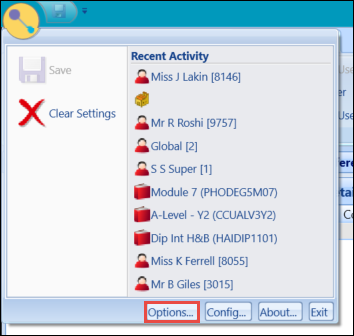
The Options window is displayed.

-
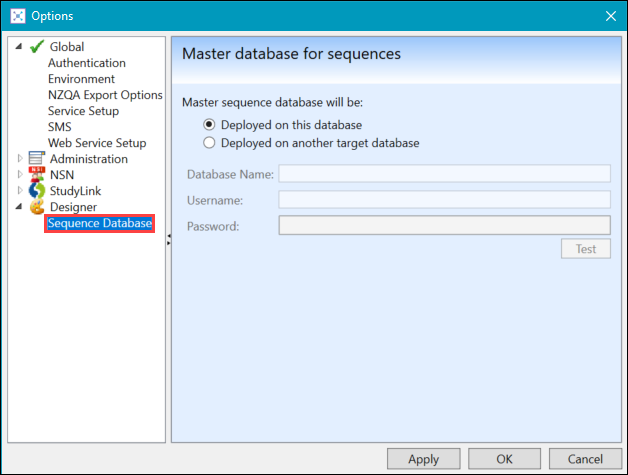
Select Sequence Database from the Designer node in the left-hand panel to display the Master database for sequences screen.
-
Set the target database to Deployed on another target database and enter the live database name.
-
Enter the database username and password, and then select the Test button to check whether the connection is working.

A message is displayed confirming whether the target has been set correctly.
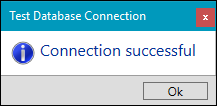
- Select OK to save your changes on the test database.
-
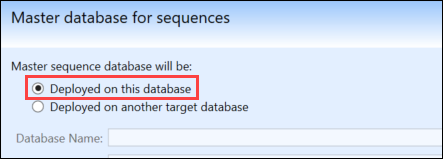
Log into the live system, open the same Options screen, and then select the Deployed on this database radio button.
-
Select OK to save your changes.
The target database is set.